

@saovrathe2-f5-tts: AttributeError: module 'pyarrow' has no attribute 'PyExtensionType'. Did you mean: 'ExtensionTy… App: e2-f5-tts (e2-f5-tts.git) Repo: https://github.com/pinokiofactory/e2-f5-tts.git Generated: 2026-11-04T05:32:37.778Z Pinokio: 8.3.1 Platform: win32 x64 Node: v24.19.0 Summary System { "pinokio": { "version": "8.3.1", "node": "v24.19.0",


Morpheus
@morpheus
404 Error not found Don't hesitate to ask if you have questions. I'm here to help. Tag me if you can.
Joined
Replies · 200
@bhabra3FaceFusion 3.9.2: ImportError: cannot import name 'MappingProxyType' from partially initialized module 'types' (m… App: FaceFusion 3.9.2 (facefusion) Repo: https://github.com/facefusion/facefusion-pinokio.git Generated: 2026-11-02T07:10:22.512Z Pinokio: 8.3.1 Platform: win32 x64 Node: v24.19.0 Summary System { "pinokio": { "version": "8.3.1", "node":
@sdpacersVideoCrafter 2: OSError: [WinError 1114] A dynamic link library (DLL) initialization routine failed. Error load… App: VideoCrafter 2 (videocrafter2.git) Repo: https://github.com/cocktailpeanutlabs/videocrafter2.git Generated: 2026-11-02T18:51:42.692Z Pinokio: 8.3.1 Platform: win32 x64 Node: v24.19.0 Summary System { "pinokio": { "version": "8.3.1",
Please install the MSVC Redistributables from Microsoft.
If yours are missing or outdated it can cause such an error.
Install them for x86 and x64.
You find them here:
If videocrafter still doesn't start, it might be because of the nightly torch wheels. In this case please install stable ones like described below:
- Make sure Videocrafter2 is not running
- Click the Menu icon of Videocrafter 2 on the main page of pinokio
- On the right side menu click Open dev mode
- At the bottom of the next page click CMD - Python Shell
- In the Terminal that appears execute this command:
uv pip install torch==2.7.0 torchvision==0.22.0 torchaudio==2.7.0 --index-url https://download.pytorch.org/whl/cu128 --force-reinstall --no-deps - If torch could be installed, stop the terminal and try to start videocrafter 2
Please let me know if this fixes your problem.
@andre_wilson61Deep-Live-Cam: ERROR: To modify pip, please run the following command: App: Deep-Live-Cam (deeplivecam.pinokio.git) Repo: https://github.com/botzero-net/deeplivecam.pinokio.git Generated: 2026-11-02T21:21:53.681Z Pinokio: 8.3.1 Platform: win32 x64 Node: v24.19.0 Summary System { "pinokio": { "version": "8.3.1
As much as I know Deep Live Cam is broken. Even without this problem. You could try Facefusion instead. It has a live cam face swap mode as well.
But if you wanted to fix this error, please:
- Make sure Deep Live Cam is not running
- Click the Menu icon of Deep Live Cam on the main page of pinokio
- On the right side menu click Open dev mode
- At the bottom of the next page click CMD - Python Shell
- In the Terminal that appears execute this command
python -m pip install -upgrade pip - If that was successful, close the Terminal and run the installation of Deep Live Cam again.
@cleardiceMaestro: AttributeError: partially initialized module 'cv2' has no attribute 'gapi_wip_gst_GStreamerPipe… App: Maestro (Maestro.git) Repo: https://github.com/Blizaine/Maestro.git Generated: 2026-10-26T08:39:05.753Z Pinokio: 8.2.0 Platform: win32 x64 Node: v22.21.1 Summary System { "pinokio": { "version": "8.2.0", "node": "v22.21.1", "platform": "win3
Hi 🙂
Not sure what went wrong in your case, but maybe it can help to reinstall the right opencv-python version (cv2).
- Click the Menu icon of Maestro on the main page of pinokio
- On the right side menu click Open dev mode
- On the following screen near the bottom click CMD - Python Shell
- In the terminal that appears execute this command:
uv pip install opencv-python==4.13.0.92 - If that worked, stop the terminal and try to start Maestro
Please let me know if this fixes your problem.
@metinaydinTRELLIS.2: ModuleNotFoundError: No module named 'cumesh' App: TRELLIS.2 (TRELLIS.2-Pinokio.git) Repo: https://github.com/Deathdadev/TRELLIS.2-Pinokio.git Generated: 2026-10-30T16:14:37.948Z Pinokio: 8.2.0 Platform: linux x64 Node: v22.21.1 Summary System { "pinokio": { "version": "8.2.0", "node
It's a problem in the built function in pinokio, not in the installer.
The new pinokio version will be released within the next days. Just update pinokio if an update is available and try to install Trellis.2 again.
But I just see you have 2GB VRAM and 12 GB RAM. This is not enough for Trellis.2 It needs at least 16GB VRAM and 32 GB RAM. With 2GB VRAM you could only use apps with very small models. And only those using an older torch version. Your GPU is too old and too small for AI apps sadly. Forge is one of the apps working with very little VRAM, but even Forge needs at least 4GB VRAM.
@younessatWan2GP: ModuleNotFoundError: No module named 'torch._logging' App: Wan2GP (wan.git) Repo: https://github.com/pinokiofactory/wan.git Generated: 2026-10-31T01:09:55.320Z Pinokio: 8.2.0 Platform: win32 x64 Node: v22.21.1 Summary System { "pinokio": { "version": "8.2.0", "node": "v22.21.1", "platform": "win32
This sounds like you have the wrong torch version. Probably the torch installation failed due to network issues. It's a big dependency.
Could you please post your install logs?
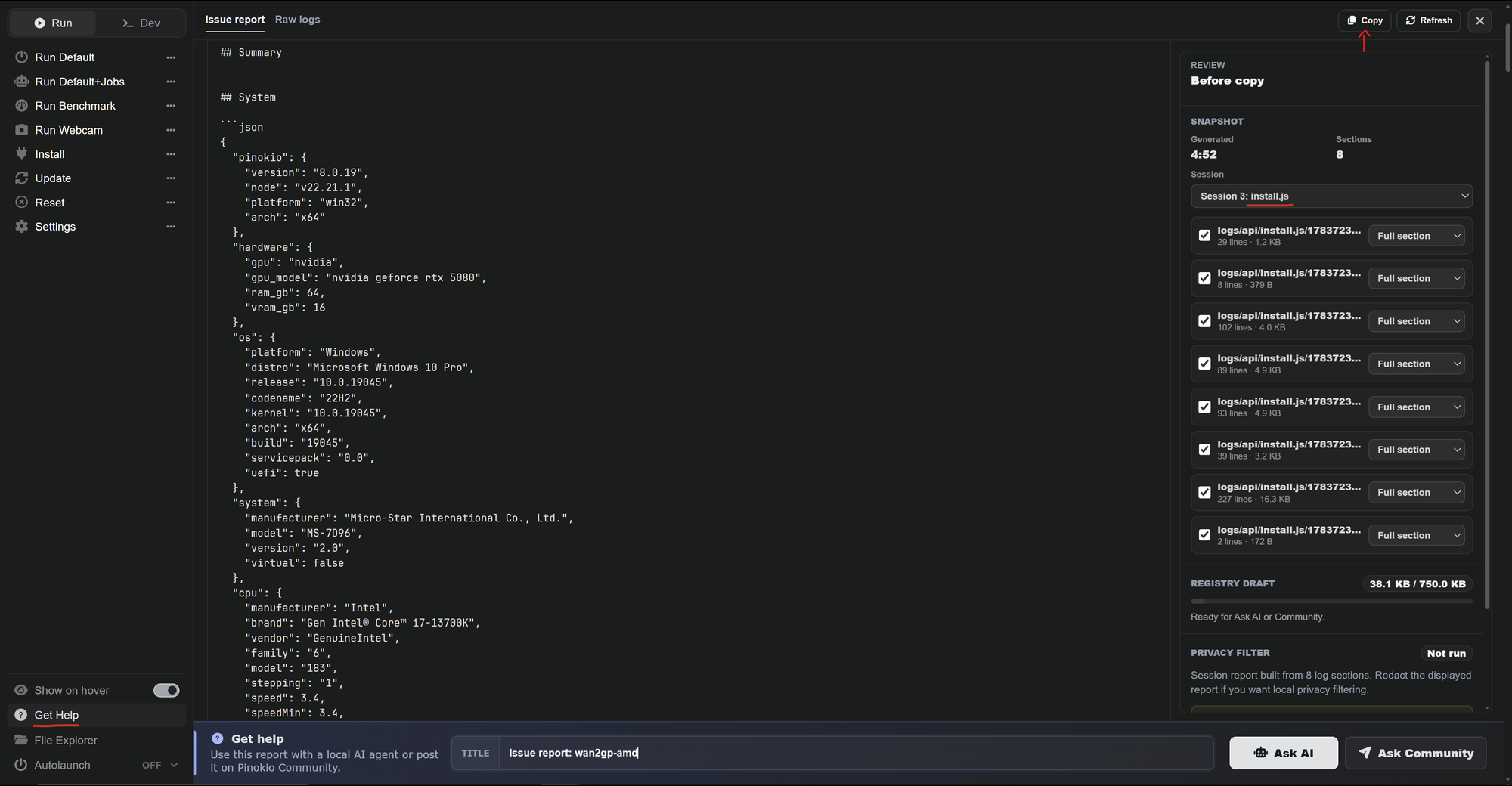
You get them if you:
- Click the Get Help button in wan2gp
- Select the install.js session at the top right
- Click the Copy button right above
- Past it in your reply
It did help. And I guess your pkg_ressources problem was also related to that. Cocktailpeanut figured out what's wrong. It was a DNS problem causing this error: Failed to fetch: https://mirrors.pku.edu.cn/pypi/simple/networkx/
So you can update again if wanted. My last modification wasn't related to the setuptools version which causes sthe pkg_ressources error. I only increased the timeout Wouldn't have helped in your case though since it was your VPN causing the troubles.
Anyway, I'm glad it works now. 🙂
@flowshowI got this issue Based on the logs from latest:149-153, here is what went wrong, the root cause, and the fix. ────── 1. What Went Wrong During media generation with the LTX-2 distilled pipeline and Gemma 3 text encoder on Apple Silicon (M3 Max), the MMGP offloading engine attempted to transfer model weights into
Thanks for providing the fix. If that's true and after applying that fix it worked for you, deepbeepmeep should know about it. This is something that can't, or better shouldn't be fixed in the launcher or manually. If you modify a script, you can't update wan2gp anymore because git refuses to pull the changes not to overwrite your modifications. And the only way to fix that is reverting the modifications or delete the modified script.
So please report it here: github.com/deepbeepmeep/WanGP/i…
In the meantime you could try Phosphene. This app is designed specifically for Apple Macs and you can generate videos with it like in wan2gp.
@alex777vrTitle: Stable Audio 3 fails after latest update: TypeError in mmgp offload.py _mapped_pages (NoneType + int) Environment: Windows, Pinokio install (C:\pinokio\api\wan.git\app), RTX 5060 Ti 16 GB, mmgp 4.4.1, git pull says "Already up to date". Description: Since the last update, generating music with Stable Audio 3 f
Hi :)
That's actually a problem of the script offload.py It's your RegionSize that i None for some reason. wan2gp doesn't take care of the case that it could be none. And an integer can't be added with None.
Could you please open an issue on the wan2gp github page? The problem is, we could fix it together, but if you modify a script, git pull would fail next time and you couldn't update wan2gp anymore because of this modification. So Deepbeepmeep needs to fix it in wan2gp.
You can post it here: github.com/deepbeepmeep/WanGP/i…
If you don't get an answer within the next days, let me know please.
@meenakshisharmaWan2GP: raise AssertionError("Torch not compiled with CUDA enabled") App: Wan2GP (wan.git) Repo: https://github.com/pinokiofactory/wan.git Generated: 2026-10-27T11:59:36.654Z Pinokio: 8.2.0 Platform: win32 x64 Node: v22.21.1 Summary System { "pinokio": { "version": "8.2.0", "node": "v22.21.1", "platform": "win32
torch wasn't installed. Or the wrong torch version. But you sent the start logs. to see why it failed and provide a solution I would need the install logs.
- Please click the Get Help button in wan2gp
- Select the install.js session at the top right
- Click the Copy button right above
- Paste it in your reply

@pinokionut2RVC: error: Request failed after 3 retries in 24.3s App: RVC (rvc.pinokio.git) Repo: https://github.com/6Morpheus6/rvc.pinokio.git Generated: 2026-10-31T02:13:39.940Z Pinokio: 8.2.0 Platform: win32 x64 Node: v22.21.1 Summary System { "pinokio": { "version": "8.2.0", "node": "v22.21.1", "plat
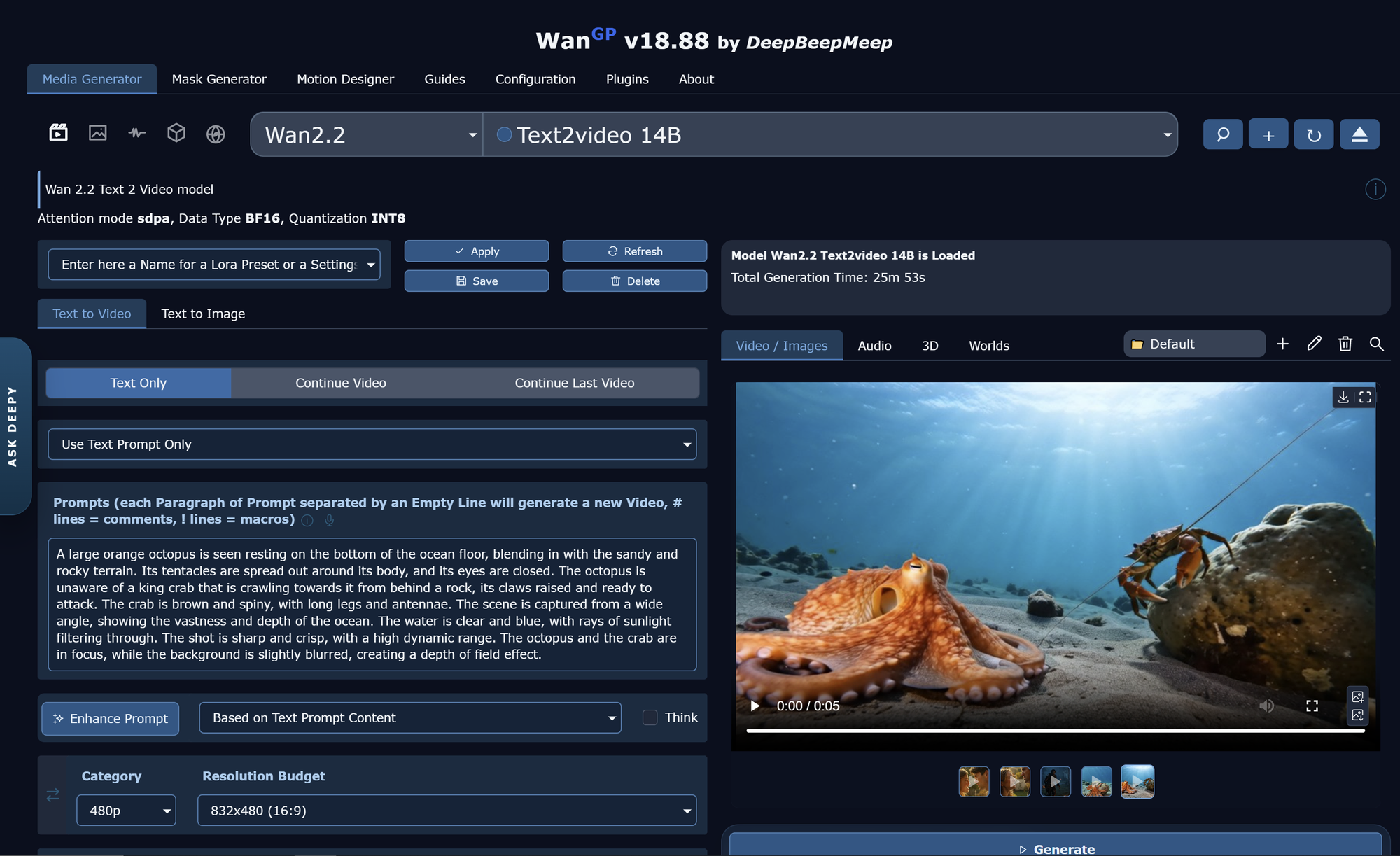
Meanwhile I replicated it and it's working. Same settings like you. Attention mode sdpa, Data Type BF16, Quantization Int8.

I had to use a smaller resolution though, or it would have needed more than 2 hours on my RTX 5080.
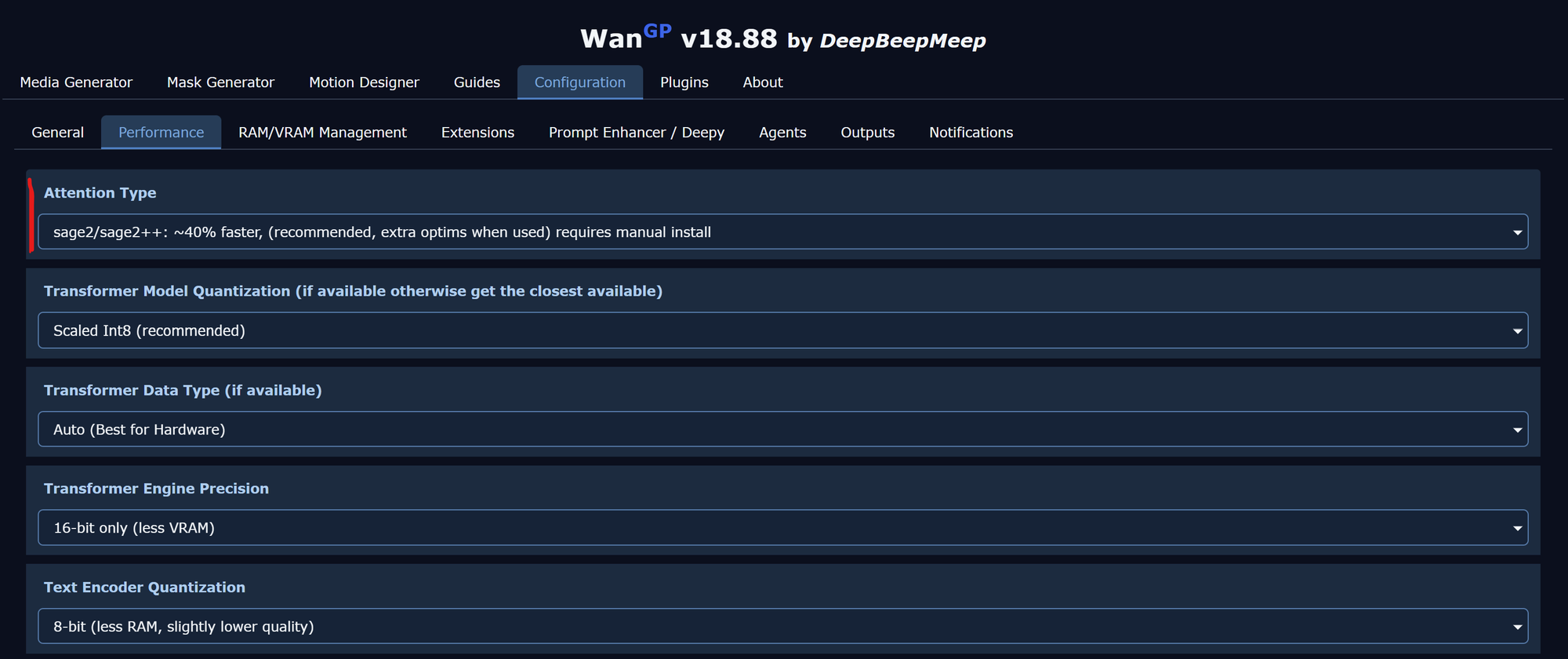
wan2.2 14B is a very slow model. Unless you don't have an RTX 3090, RTX 4090 or RTX 5090 I wouldn't recommend to use it with 720p. You should also use sage2 instead of sdpa. With sage2 it only needed 8 min.
To do so, click Configuration at the top and set Attention Type to sage2 and Save the settings at the bottom.

@flowshowsame error I got and the logs in terminal as pinokio/api/wan.git/app/mmgp/pinned.py", line 55, in register error = torch.cuda.cudart().cudaHostRegister(self.pointer, self.size, self.flags) ^^^^^^^^^^^^^^^^^^^^^^^^^^^^^^^^^^^^ AttributeError: 'NoneType' object has no attribute 'cudaHostRegister' Error


It seems your datasets version is too low. I'll have a look if that's a general problem with e2-f5-tts and fix it if necessary.
What you can try to fix it for you at once, is this:
uv pip install "datasets>=2.20.0"Please let me know if this fixes your problem.