
Pinokio
FeedApps
Author@andreaswb
Download Pinokio
Sign inCreate accountJoin

@andreaswb

Joined May 2026

0 Following0 Followers
PostsReplies
More
ActivityCheckpointsFollowed appsGitHub creations
Posts · 4
@andreaswb
3mo ago

FP-Studio does not obey timestamped prompts

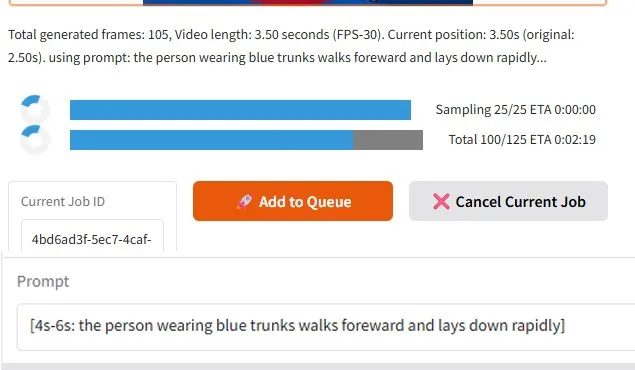
FP-Studio documents which part of a timestamped promt is used for the generation. But 1. as it generates the part of the video which is described in the prompt by timestamp, it does not create the requested action. 2. In the protocol it states to use the command, but on a very earlier (real) time as requested in the prompt. In the picture I show the protocolled action of FP-Studio and below I show the used prompt. The setting I used is Original with Endframe (Startframe + Endframe). I studied several tutorials and other hints, but it never worked. Steps to reproduce 1. Your system (OS / GPU /
FramePack-StudioFP-Studio/fp-studio
#bug
0
@andreaswb
4mo ago

How to start the creation of the video?

Hi, now I succeeded to install FP-Studio and get the surface for all entries operating. So I entered a Picture, selected the type "Original", entered a prompt. All other options I let on their default values. Now: Where is the Generation- Button to start the video generation? Or how to start the process?

FramePack-StudioFP-Studio/fp-studio
4
@andreaswb
4mo ago

Installation does not work

Hi, now I spent all the weekend in vain. On the githup FramePack site, the direct "one-click" link is broken - 404 Next I tried the docker installation. After creating a new user account on docker I could install and start the docker environment. But the described mechanisms for installation didn't work - unknown docker commands. Only got the -help description from docker. Next I tried the pure manual install. I halfways succeeded. I found a lot of wrong paths in the description. But however. Even after entering the corret CUDA version, correcting the statements of the different steps, ... As

FramePack-StudioFP-Studio/fp-studio
0
@andreaswb
4mo ago

FP-Studio installation failure

Hi, I just installed FramePack Studio. I used the pre-defined installer, which did the job quick and well. Pinokio was installed some days earlier, cause I first did some videos with the "native" FramePack. As I now started FramePack-Studio, I got this blue-screen message: --- Attention Configuration --- ⚠️ No attention library found. Using native PyTorch Scaled Dot Product Attention. - For better performance, consider installing one of: SAGE Attention (highest performance), Flash Attention (high performance), or xFormers. ------------------------------- Traceback (most recent call last): File

FramePackpinokiofactory/Frame-Pack
2
You’re all caught up.
Pinokio
PrivacyTerms
FeedApps