You can now run Ideogram 4 with WanGP with 6GB VRAM.
JSON based prompting for precise description
It seems that you have to use the JSON prompt to get great results (I tried prompting with plain text and couldn't get good quality images, but if you know how, please let me know in the comments).
While the JSON based prompting is kind of tricky, it's also the biggest strength of this model, because you can describe the image PRECISELY, including the layout and style of every component in the image (check the video below)
{
  "aspect_ratio": "4:3",
  "high_level_description": "A playful cinematic highway scene of a large pink elephant standing in a white bathtub on the flatbed trailer of a moving semi-truck, using its raised trunk like a shower hose to spray water over its own head and back, low-angle view, bright daylight, motion-blurred road scenery.",
  "style_description": {
    "medium": "graphic_design"
  },
  "compositional_deconstruction": {
    "background": "A sunlit highway with asphalt lanes receding into the distance, pale blue sky, soft clouds, and motion-blurred roadside vegetation. The scene is viewed from a low roadside angle, making the flatbed truck and elephant feel large and dynamic.",
    "elements": [
      {
        "type": "obj",
        "bbox": [120, 739, 616, 1000],
        "desc": "A massive African elephant with wrinkled gray skin standing inside the bathtub. Its ears are spread wide, its body faces slightly right, and its trunk curls upward above its head, spraying a bright arc of water down over its own forehead, ears, shoulders, and back as if showering itself."
      },
      {
        "type": "obj",
        "bbox": [80, 330, 420, 720],
        "desc": "A curved stream of clear sparkling water spraying from the elephant's raised trunk, arcing upward and falling back onto the elephant like a shower. Fine mist and droplets catch the sunlight around the elephant's head and upper body."
      },
      {
        "type": "obj",
        "bbox": [560, 190, 840, 840],
        "desc": "A rectangular white fiberglass bathtub with rounded corners, placed firmly on the truck flatbed. The tub is filled with sloshing clear water, small waves, foam, and splashes caused by the elephant standing and showering inside it."
      },
      {
        "type": "obj",
        "bbox": [650, 0, 920, 1000],
        "desc": "A dark gray flatbed trailer extending horizontally across the lower part of the image. Its metal surface has worn texture, tie-down straps around the bathtub, visible wheel assemblies below, and slight motion blur showing the truck is moving."
      },
      {
        "type": "obj",
        "bbox": [390, 20, 680, 260],
        "desc": "The semi-truck cab ahead on the left side of the frame, dark gray and angled slightly away from the camera, connected to the flatbed and partially blurred by speed and perspective."
      }
    ]
  }
}
Prompt helper
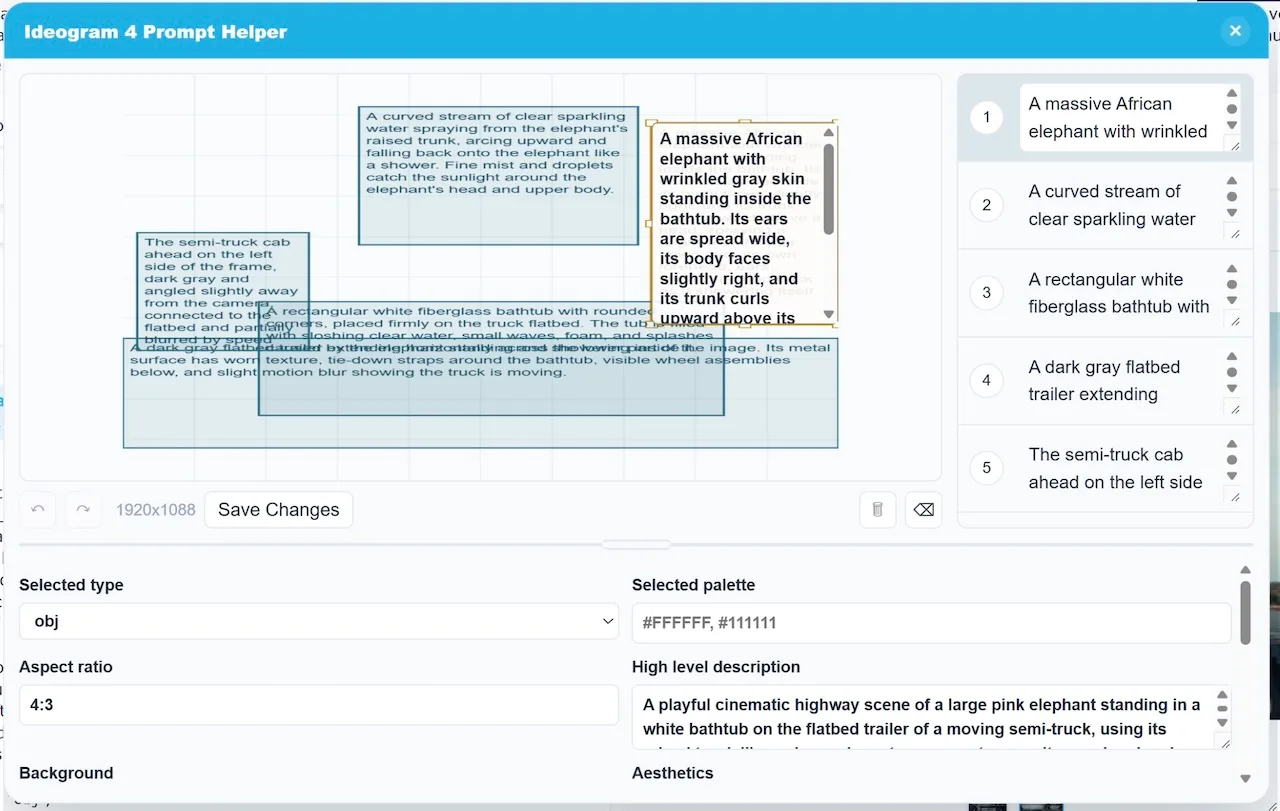
Fortunately WanGP has a prompt helper that lets you compose the JSON prompt. Just click the small magic wand button on the prompt field and it will display a modal.
Notice how you can drag and explain each region in the image, and when you save, that will compose the corresponding JSON prompt.

You can now run Ideogram 4 with WanGP with 6GB VRAM.
JSON based prompting for precise description
It seems that you have to use the JSON prompt to get great results (I tried prompting with plain text and couldn't get good quality images, but if you know how, please let me know in the comments).
While the JSON based prompting is kind of tricky, it's also the biggest strength of this model, because you can describe the image PRECISELY, including the layout and style of every component in the image (check the video below)
Prompt helper
Fortunately WanGP has a prompt helper that lets you compose the JSON prompt. Just click the small magic wand button on the prompt field and it will display a modal.
Notice how you can drag and explain each region in the image, and when you save, that will compose the corresponding JSON prompt.