Underfit is for musicians, sound designers, sample makers, and audio experimenters who want Stable Audio 3 to learn a specific sound.
Underfit only works on NVIDIA GPU machines at the moment
Instead of prompting a general model and hoping it understands your references, you give Underfit a folder of audio and train a small adapter file called a LoRA. That LoRA can then steer Stable Audio 3 toward your style, genre, instrument set, sound effect family, or production texture.
This is not a general music app for typing one prompt and getting one song. It is a workshop for making your own reusable style adapter.
What Underfit Is For
Use Underfit when you have a collection of audio examples and want Stable Audio 3 to absorb the feel of that collection. Good examples include:
- A folder of drum loops with the same mix character
- A set of sound effects in one category, such as impacts, drones, risers, glitches, or vocal textures
- A coherent music style, artist study, or production palette
- A texture you want to reuse across many prompts
- A small private dataset you want to shape into a portable
.safetensors adapter
The key word is coherent. A tight folder of related audio usually trains better than a messy pile of unrelated files. Underfit can help you explore the messy pile, but the best results usually come from choosing one clear target style per dataset.
Examples
- Train on your own music style: Feed it 10-30+ minutes of your tracks so prompts like TrackType: Music, Genre: industrial techno, mytrigger generate new material with your rhythm, tone, mix density, and sound palette.
- Make a custom sample-pack generator: Train on your own drum loops, synth loops, bass shots, or texture beds, then generate endless variations that still sound like the pack.
- Specific instrument timbre: Train on recordings of one unusual sound source: prepared piano, modular synth patches, bowed guitar, circuit-bent toys, metallic percussion, etc.
- SFX category LoRA: Train on one coherent SFX class, like impacts, whooshes, risers, UI blips, footsteps, weapons, magic spells, engine sounds, or horror ambiences.
- Game audio style: Train on a game’s existing audio direction, then generate matching menu loops, combat stingers, UI clicks, ambience beds, or creature sounds.
- Trailer sound design: Train on your own braams, hits, risers, reverses, drones, and transitions to generate more material in the same trailer palette.
- Genre micro-style: Train on a narrow genre slice: harsh noise wall, dungeon synth, footwork, death metal intros, vaporwave loops, breakcore drums, ambient guitar swells.
- Audio2audio style transfer: Train a LoRA on a style, then feed in source audio and use the LoRA to pull it toward that style, like turning clean drums into distorted industrial drums.
- Brand sonic identity: Train on podcast stingers, app sounds, logo sounds, notification tones, and ad music so generated audio stays inside a recognizable brand palette.
- Dataset blending: Train one LoRA on a musical style, then continue from that checkpoint on a second dataset, like “baroque metal + polished bass music production.”
- Controlled overfit for remixing: Sometimes you intentionally train longer so it strongly memorizes a sound world, then use lower LoRA strength, skipped first denoising step, or audio2audio to avoid straight copies.
- Prompt-conditioned library generation: Add tags like BPM, Genre, Mood, Instrument, Artist, or folder-path prompts so the LoRA learns controllable variations instead of just one vague style.
What You Need Before Starting
Underfit is built for local GPU training. Before you start, make sure you have:
- An NVIDIA GPU. 16 GB VRAM is comfortable; 8 GB can work with conservative settings.
- Enough disk space for Stable Audio 3 model files and your datasets. Plan for tens of GB.
- A folder of audio files. WAV, FLAC, MP3, OGG, OPUS, M4A, and AIFF are supported.
- A little patience. Dataset encoding and training are real GPU jobs, not instant filters.
If model download fails with an access or license error, open the Stable Audio 3 model page on Hugging Face and accept the license. After that, run the install again.
Your First Dataset
Inside the dashboard, start with NEW DATASET.
Choose the folder that contains your audio.
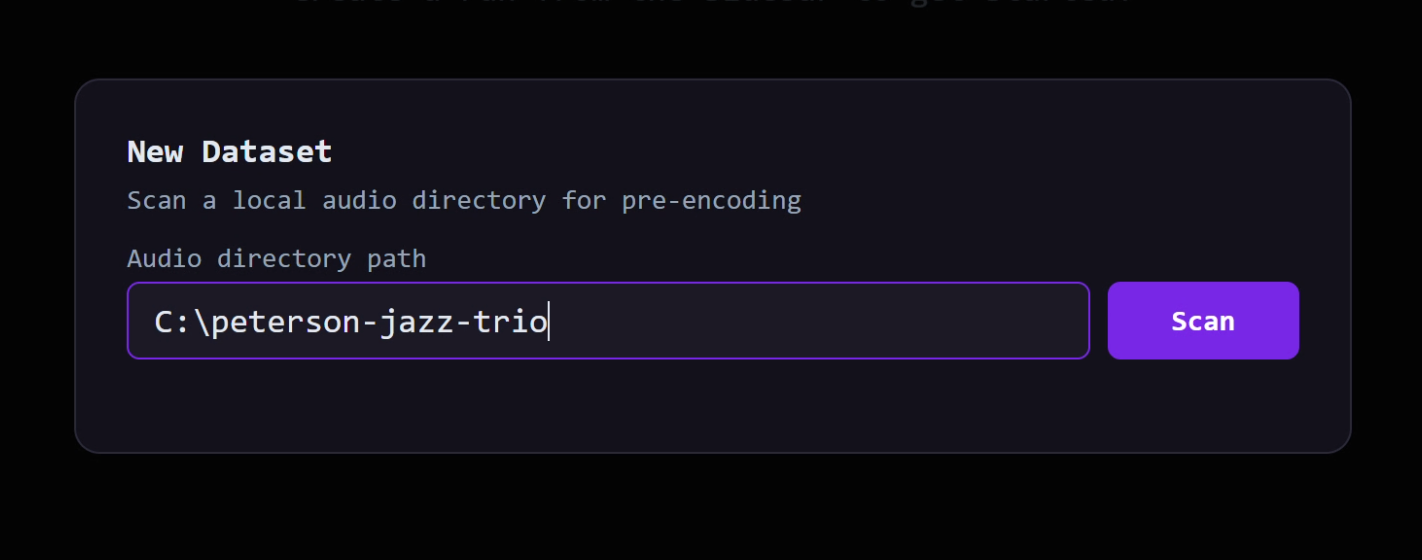
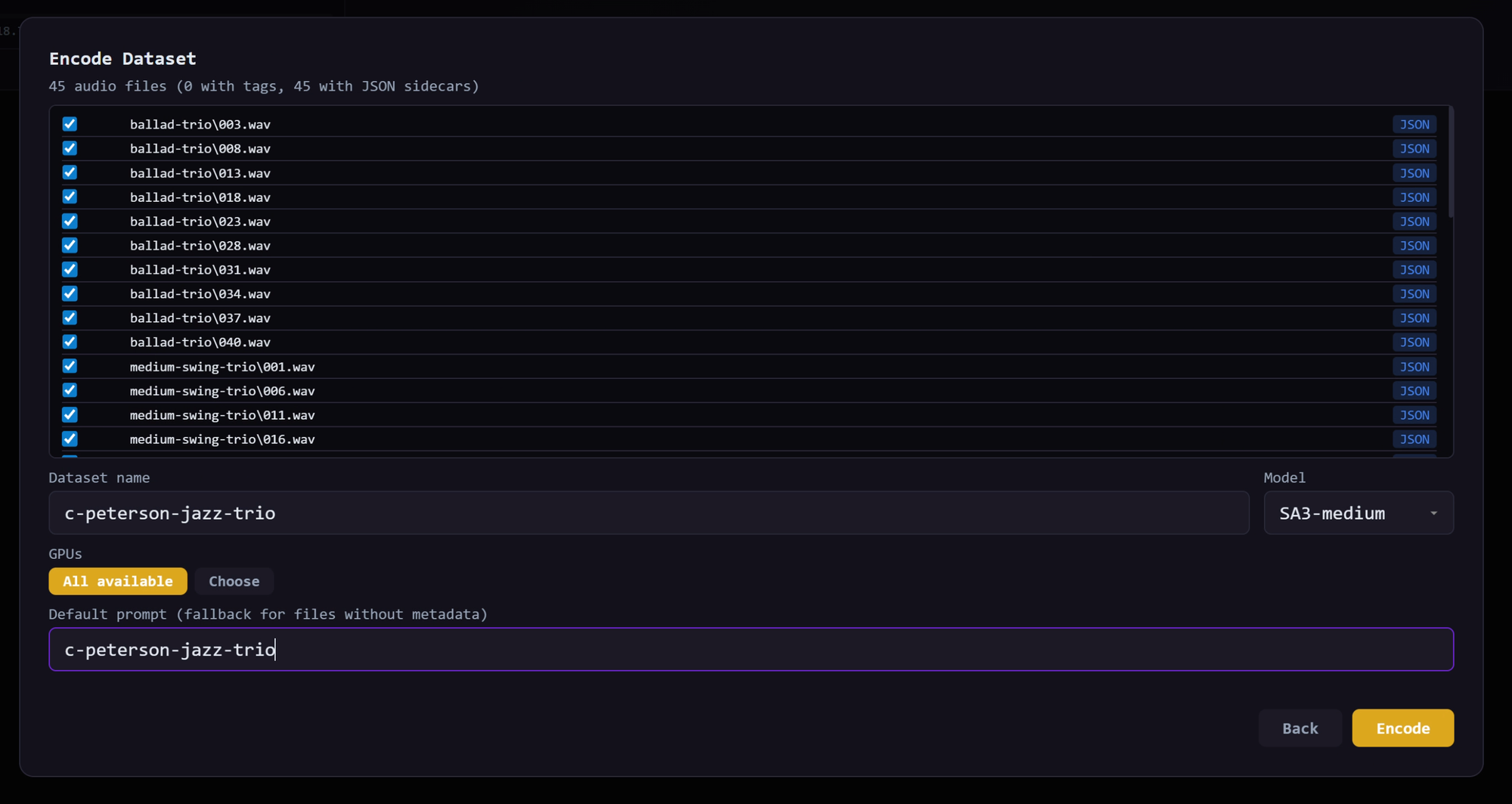
Underfit scans it, lets you review the files, then encodes the audio into a training-ready dataset. This pre-encoding step saves time later because training can read compact latent files instead of decoding raw audio repeatedly.
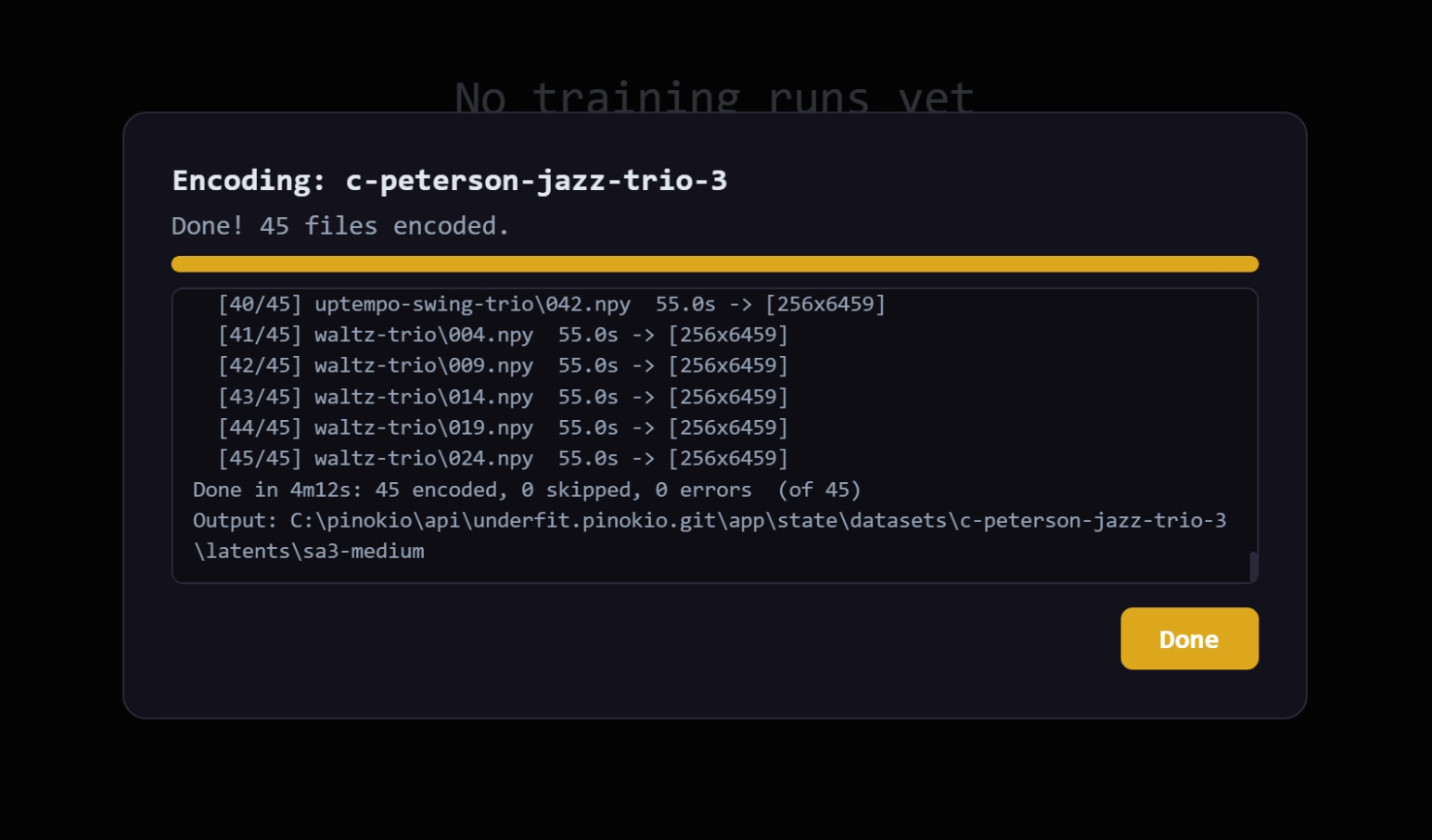
When you click encode, it will take a bit to encode the files and end with:
For a first run, keep the dataset focused:
- Aim for at least 10 minutes of audio.
- 30 minutes or more is better if the style is consistent.
- Avoid mixing unrelated genres or sound categories.
- Remove obvious bad files, silence, clipping, or wrong examples.
- If the folder structure has meaning, keep it organized. Underfit can use paths as prompt hints.
If your audio files have metadata, sidecar .json files, or .txt prompt files, Underfit can use that information when building prompts. If not, you can still train with a simple fixed phrase such as citypop-style, dusty-drum-breaks, or glass-impact-sfx.
Recommended if you use AI agents
IMO the best way to create a dataset is
- Put all the sample files in a folder (or even a single 1 hour clip)
- Ask your ai agent to create a dataset for https://github.com/dada-bots/underfit
Then it should take care of everything.
Starting a Finetune
After the dataset says it is ready, click NEW FINETUNE.
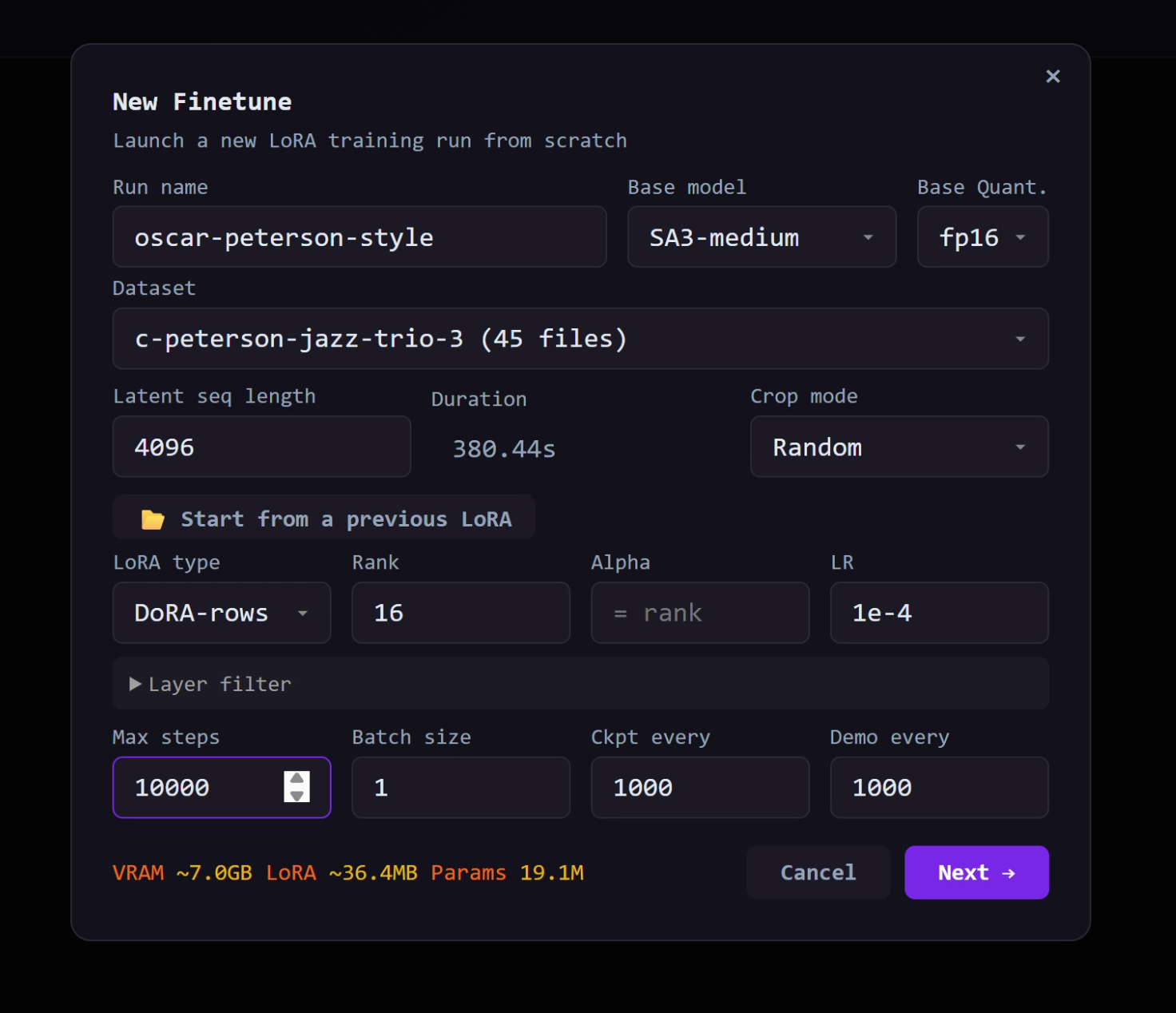
For a first attempt, use conservative settings. You can get creative after you have one working run.
| Setting |
Practical first choice |
| Model |
sa3-medium |
| LoRA type |
DoRA |
| Rank |
16 if you have VRAM, 4 to 8 on smaller GPUs |
| Batch size |
1 on 8 GB GPUs |
| Checkpoint every |
500 or 1000 steps |
| Demo every |
500 or 1000 steps |
| Prompt style |
Fixed phrase plus useful tags, if available |
Do not treat bigger numbers as automatically better. A higher rank or bigger batch can use more memory and may push the adapter toward memorizing the dataset. Underfit is useful because you can listen as it trains and keep the checkpoint that sounds right, not just the final one.
Prompt Setup Without Overthinking It
The prompt setup screen decides what text the model sees during training.
For a small, single-style dataset, the simplest option is a fixed phrase. Pick a phrase you will remember and use later in generation, like:
oscar-peterson-style
For a better dataset with clean tags, try a mix:
- Fixed phrase for the overall style
- Tags for useful details such as genre, BPM, title, mood, or instrument
- Paths if your folders describe the content
This gives you two ways to use the LoRA later: a broad trigger phrase for the overall style, or the trigger phrase plus extra detail for more directed generations.
Watching Training
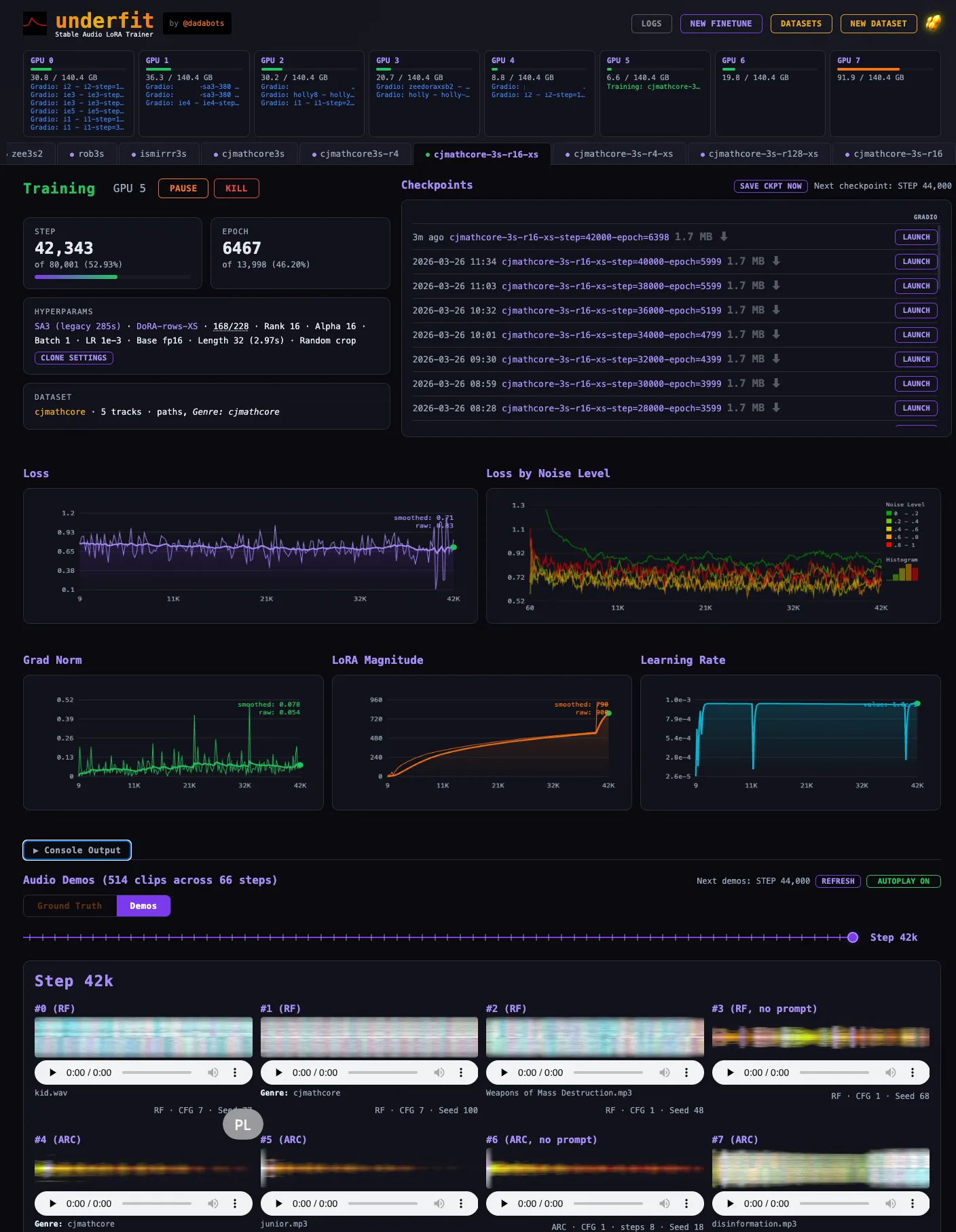
Once you launch the run, Underfit shows status, loss charts, demos, and checkpoints.
The loss curve is useful, but your ears matter more. Every demo interval, Underfit creates MP3 previews and spectrogram images so you can hear how the adapter is changing.

Listen for three things:
- Does the generated audio start to resemble your dataset's tone or rhythm?
- Does it still respond to prompts, or is it just copying the training examples?
- Do earlier checkpoints sound more flexible than later checkpoints?
Many useful LoRAs are not the final checkpoint. Sometimes the best one is where the model has clearly learned the style but has not started repeating the dataset too closely. Save and compare checkpoints as you go.
Using the Finished LoRA
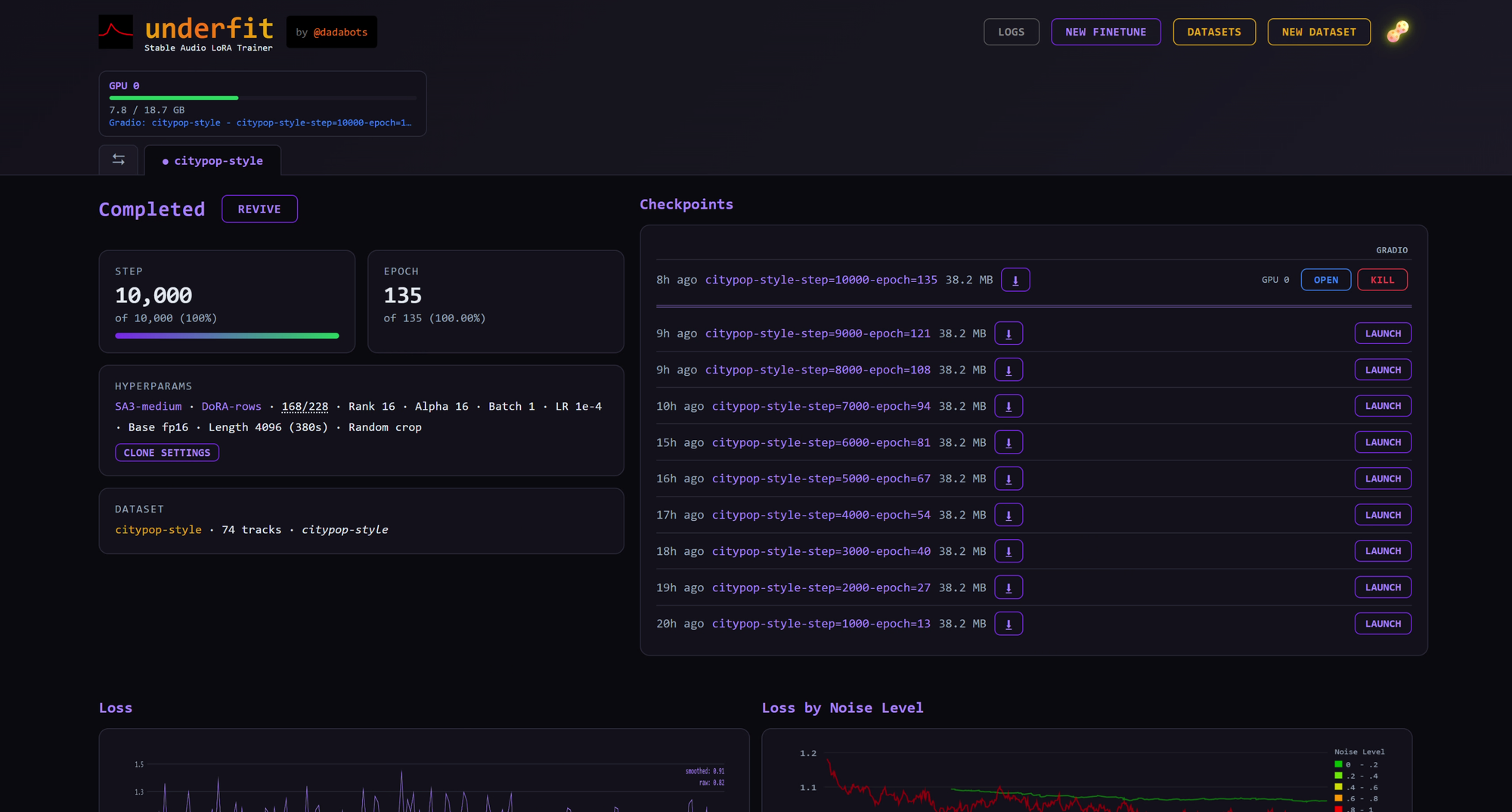
Depending on how you set the config, underfit will keep generating intermediate checkpoints along the way. You can either download, or launch it in a gradio app to actually try it out (even while training is going on)
When a checkpoint sounds good, download the .safetensors file from the checkpoint list. That file is the useful artifact. You can keep it, share it, archive it with your project, or load it in a Stable Audio 3 inference setup that supports LoRAs.
From Underfit, you can also click Launch on a checkpoint to open an inference UI. This is where you test the adapter with new prompts.
Good first inference habits:
- Start with the same trigger phrase you used during training.
- Lower LoRA strength if the result sounds too much like the dataset.
- Try audio-to-audio when you want to push an existing clip into the trained style.
- Try inpainting when you only want to regenerate part of a clip.
- Compare several checkpoints. The most trained checkpoint is not always the most useful one.
Low-VRAM Advice
If you are on an 8 GB GPU, keep the first run small:
- Batch size
1
- Rank
4 to 8
- Shorter latent crop length
- Fewer demos while experimenting
- One training run at a time
Underfit is still usable this way, but expect slower iteration. Start with a small dataset and prove the workflow before committing to a long run.
Common Pitfalls
The app works best when the dataset has a point of view. If your LoRA is weak, the dataset may be too varied, the rank may be too low, or the run may need more steps. If the LoRA sounds like it is copying examples too directly, try an earlier checkpoint, a lower rank, shorter crop length, or lower LoRA strength during inference.
If the dashboard opens but training will not start, check the GPU panel. Encoding and training require an NVIDIA GPU available to the app.
If the install fails during model download, accept the Stable Audio 3 license on Hugging Face and retry.
If you only want a one-off generated audio clip, Underfit is more tool than you need. If you want to build a reusable style adapter from your own audio, it is exactly the right kind of tool.
A Sensible First Project
For a first real test, make a folder with 20 to 40 minutes of related audio. Give it a clear name. Use a fixed trigger phrase. Train with DoRA, rank 8 or 16, batch size 1, and save checkpoints every 1000 steps. Listen at each checkpoint. Keep the one that captures the style while still producing fresh variations.
That is the practical Underfit loop: collect a focused sound, encode it, train carefully, listen often, keep the best checkpoint, and use that LoRA as a reusable creative tool.
Underfit is for musicians, sound designers, sample makers, and audio experimenters who want Stable Audio 3 to learn a specific sound.
Instead of prompting a general model and hoping it understands your references, you give Underfit a folder of audio and train a small adapter file called a LoRA. That LoRA can then steer Stable Audio 3 toward your style, genre, instrument set, sound effect family, or production texture.
This is not a general music app for typing one prompt and getting one song. It is a workshop for making your own reusable style adapter.
What Underfit Is For
Use Underfit when you have a collection of audio examples and want Stable Audio 3 to absorb the feel of that collection. Good examples include:
.safetensorsadapterThe key word is coherent. A tight folder of related audio usually trains better than a messy pile of unrelated files. Underfit can help you explore the messy pile, but the best results usually come from choosing one clear target style per dataset.
Examples
What You Need Before Starting
Underfit is built for local GPU training. Before you start, make sure you have:
If model download fails with an access or license error, open the Stable Audio 3 model page on Hugging Face and accept the license. After that, run the install again.
Your First Dataset
Inside the dashboard, start with NEW DATASET.
Choose the folder that contains your audio.
Underfit scans it, lets you review the files, then encodes the audio into a training-ready dataset. This pre-encoding step saves time later because training can read compact latent files instead of decoding raw audio repeatedly.
When you click encode, it will take a bit to encode the files and end with:
For a first run, keep the dataset focused:
If your audio files have metadata, sidecar
.jsonfiles, or.txtprompt files, Underfit can use that information when building prompts. If not, you can still train with a simple fixed phrase such ascitypop-style,dusty-drum-breaks, orglass-impact-sfx.Recommended if you use AI agents
IMO the best way to create a dataset is
Then it should take care of everything.
Starting a Finetune
After the dataset says it is ready, click NEW FINETUNE.
For a first attempt, use conservative settings. You can get creative after you have one working run.
sa3-mediumDoRA16if you have VRAM,4to8on smaller GPUs1on 8 GB GPUs500or1000steps500or1000stepsDo not treat bigger numbers as automatically better. A higher rank or bigger batch can use more memory and may push the adapter toward memorizing the dataset. Underfit is useful because you can listen as it trains and keep the checkpoint that sounds right, not just the final one.
Prompt Setup Without Overthinking It
The prompt setup screen decides what text the model sees during training.
For a small, single-style dataset, the simplest option is a fixed phrase. Pick a phrase you will remember and use later in generation, like:
For a better dataset with clean tags, try a mix:
This gives you two ways to use the LoRA later: a broad trigger phrase for the overall style, or the trigger phrase plus extra detail for more directed generations.
Watching Training
Once you launch the run, Underfit shows status, loss charts, demos, and checkpoints.
The loss curve is useful, but your ears matter more. Every demo interval, Underfit creates MP3 previews and spectrogram images so you can hear how the adapter is changing.
Listen for three things:
Many useful LoRAs are not the final checkpoint. Sometimes the best one is where the model has clearly learned the style but has not started repeating the dataset too closely. Save and compare checkpoints as you go.
Using the Finished LoRA
Depending on how you set the config, underfit will keep generating intermediate checkpoints along the way. You can either download, or launch it in a gradio app to actually try it out (even while training is going on)
When a checkpoint sounds good, download the
.safetensorsfile from the checkpoint list. That file is the useful artifact. You can keep it, share it, archive it with your project, or load it in a Stable Audio 3 inference setup that supports LoRAs.From Underfit, you can also click Launch on a checkpoint to open an inference UI. This is where you test the adapter with new prompts.
Good first inference habits:
Low-VRAM Advice
If you are on an 8 GB GPU, keep the first run small:
14to8Underfit is still usable this way, but expect slower iteration. Start with a small dataset and prove the workflow before committing to a long run.
Common Pitfalls
The app works best when the dataset has a point of view. If your LoRA is weak, the dataset may be too varied, the rank may be too low, or the run may need more steps. If the LoRA sounds like it is copying examples too directly, try an earlier checkpoint, a lower rank, shorter crop length, or lower LoRA strength during inference.
If the dashboard opens but training will not start, check the GPU panel. Encoding and training require an NVIDIA GPU available to the app.
If the install fails during model download, accept the Stable Audio 3 license on Hugging Face and retry.
If you only want a one-off generated audio clip, Underfit is more tool than you need. If you want to build a reusable style adapter from your own audio, it is exactly the right kind of tool.
A Sensible First Project
For a first real test, make a folder with 20 to 40 minutes of related audio. Give it a clear name. Use a fixed trigger phrase. Train with
DoRA, rank8or16, batch size1, and save checkpoints every 1000 steps. Listen at each checkpoint. Keep the one that captures the style while still producing fresh variations.That is the practical Underfit loop: collect a focused sound, encode it, train carefully, listen often, keep the best checkpoint, and use that LoRA as a reusable creative tool.