

Phosphene is a free desktop panel for generating video on Apple Silicon Macs. It wraps Lightricks' LTX 2.3 model running natively on Apple's MLX framework, and exposes a one-click install through Pinokio.
The differentiator is audio. LTX 2.3 generates video and audio in a single forward pass — they share the same diffusion process, so timing is tied at the frame level. Footsteps land on the correct frame. Lip movement matches dialogue. Ambient sound is conditioned on the visual content. Most other local video models (Wan, Hunyuan, Mochi) generate silent video; you add audio in post.
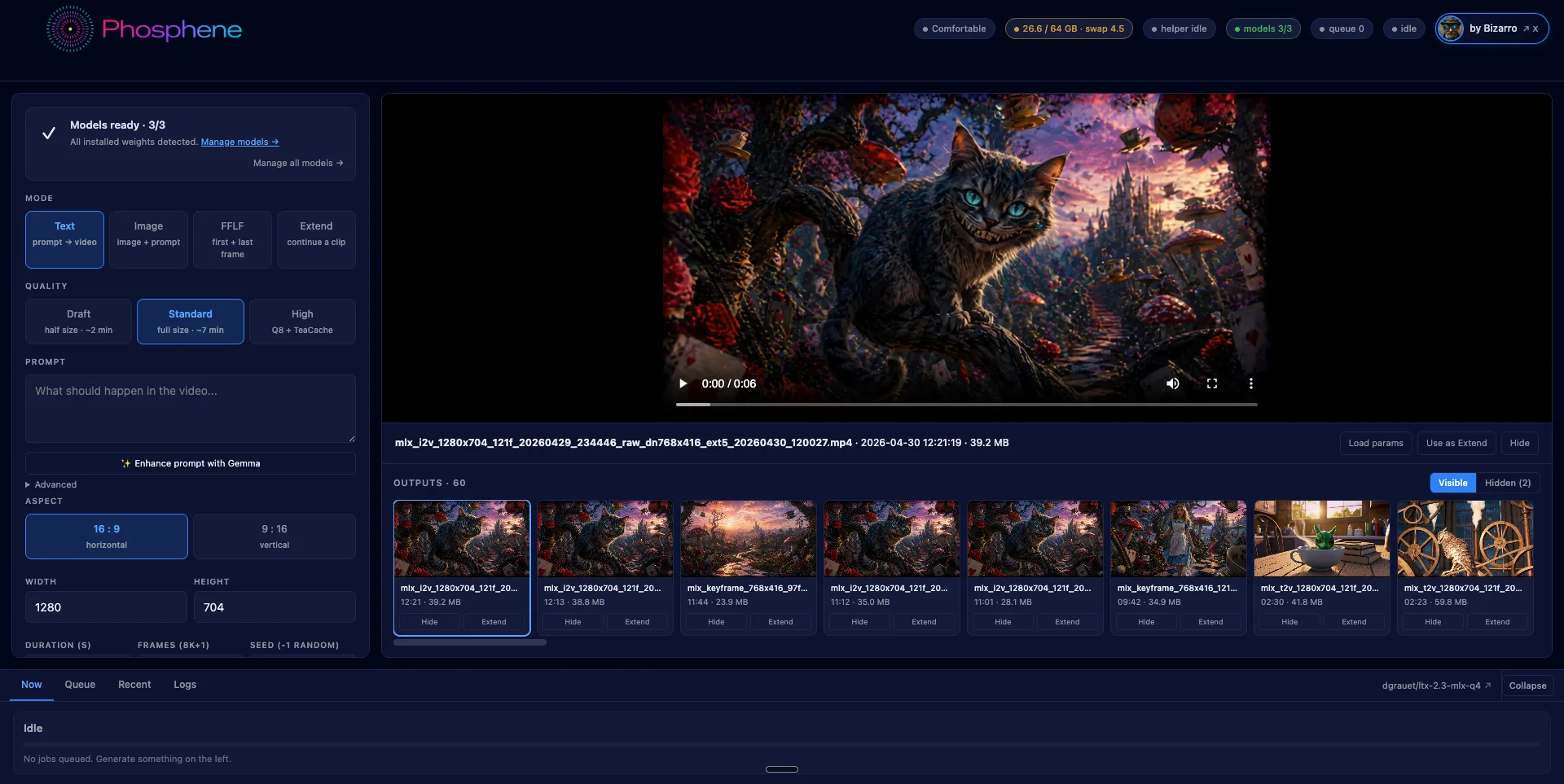
What it can do
Four generation modes:
- Text → video — describe a scene, get a 5-second clip with synthesized audio
- Image → video — start from a still, animate from there with synced audio
- First-frame / Last-frame — provide two images, the model interpolates the middle
- Extend — append seconds onto an existing clip, audio continuous across the join
Plus prompt rewriting via a local Gemma 3 12B 4-bit text encoder. The same model that reads your prompt for the diffusion stage can also rewrite it in the format LTX 2.3 was trained on. Runs offline, takes a few seconds.
Quality tiers
Three quality levels, picked per-job:
- Draft — half resolution, ~2 minutes. For iterating on prompts.
- Standard — full 1280×704, 7 minutes. The daily driver. Q4 distilled (25 GB on disk).
- High — Q8 two-stage with TeaCache acceleration, ~12 minutes. Adds ~25 GB. Optional download — a button in the panel pulls it on demand. Required for FFLF.
Hardware compatibility
Apple Silicon only. The panel detects your Mac's RAM at boot and gates features accordingly:
- 32 GB → Compact: lower resolution, shorter clips
- 64 GB → Comfortable: full 1280×704 baseline
- 96 GB → High: longer clips, full Q8
- 128+ GB → Pro: no clamps
This is enforced because LTX 2.3's working tensor footprint is real — there is no way to run a full 1280×704 5-second generation in less than ~30 GB of resident memory. The tier system is honest about it rather than letting users queue jobs that fall out of the OOM killer.
Intel Macs and other platforms are not supported. There is no port path for them — MLX is Apple-only by design.
Audio behavior
Audio quality is conditioned on the prompt. A visual-only prompt produces faint ambient sound, which can read as "near-silent." A prompt with explicit audio cues produces layered foreground sound.
Compare:
- "Wizard in forest" → quiet room tone
- "Wizard in forest, low whispered chant, ember crackle, distant owl hoot" → audible chant + crackle + owl, all timed to the visuals
This is documented behavior of LTX 2.3, not a Phosphene quirk. Describe the soundscape in your prompt the same way you describe the visual.
How it differs from existing tools
Compared to other locally-runnable video models on a Mac:
- vs. ComfyUI workflows — ComfyUI runs LTX 2.3 too, but in a node graph that requires building per-job. Phosphene is a fixed panel: prompt, mode, dimensions, generate. No graph maintenance.
- vs. native PyTorch builds (Wan, Mochi, Hunyuan) — those run on torch via MPS, which is a compatibility shim, not native Metal. MLX runs the model directly in Apple's compute framework. The result is meaningful speed and memory differences on the same hardware.
- vs. cloud / API services (Pika, Runway) — those generate faster on H100s but require accounts, queue time, monthly subscriptions, and upload of source images. Phosphene runs with no network beyond the initial weight download.
- vs. silent local video models — joint audio synthesis is, at the time of writing, unique to LTX 2.3 among models with usable Mac runtimes.
Output format
Lossless H.264 by default — yuv444p, CRF 0 — so your archive is the highest fidelity the renderer can produce. Web/social platforms will re-encode anyway. Override via env variables (LTX_OUTPUT_PIX_FMT, LTX_OUTPUT_CRF) if you want yuv420p directly.
The +faststart movflag is on, so the moov atom is at the front of the file. Gallery thumbnails decode the first frame instantly without downloading the full clip.
Install
Search Phosphene in Pinokio's Discover tab and click Install. Pinokio handles the venv, Python 3.11 pin, MLX pipeline install, codec patches, and ~31 GB of model downloads (Q4 LTX 2.3 + Gemma text encoder). Resumable — if a download is interrupted, hitting Install again picks up where it left off.
Optional: run "hf auth login" in Terminal first to authenticate the Hugging Face downloads. Anonymous downloads are throttled; authenticated downloads are roughly 10× faster, which matters for the optional 25 GB Q8 model.
[ATTACH VIDEO: phosphene_hero_x.mp4]
License + credits
Phosphene panel: MIT.
LTX 2.3 weights: Lightricks' own license — read it before commercial use.
MLX framework: Apache 2.0 (Apple).
Gemma weights: Google's terms.
Built on:

- LTX 2.3 model — Lightricks
- MLX port (ltx-2-mlx) — @dgrauet
- MLX framework — Apple ML
- Pinokio runtime — @cocktailpeanut
Source: github.com/mrbizarro/phosphene. Issues and PRs welcome.