Ideoprompt lets you explain an image in descriptive natural language and generates an Ideogram bbox JSON prompt, completely local (via Qwen3)
This means you can use Ideogram like using gpt-image-2, simply describe the image with natural language, and the local LLM (Qwen) turns that into Ideogram JSON prompt that's validated against the Ideogram prompt schema. Which means you get 100% correct prompts you can use on your favorite Ideogram image generation app.
Example
Here I entered:
A simple illustration of three children standing side by side, arranged in increasing height from left to right, with the shortest child on the left, the medium-height child in the center, and the tallest child on the right
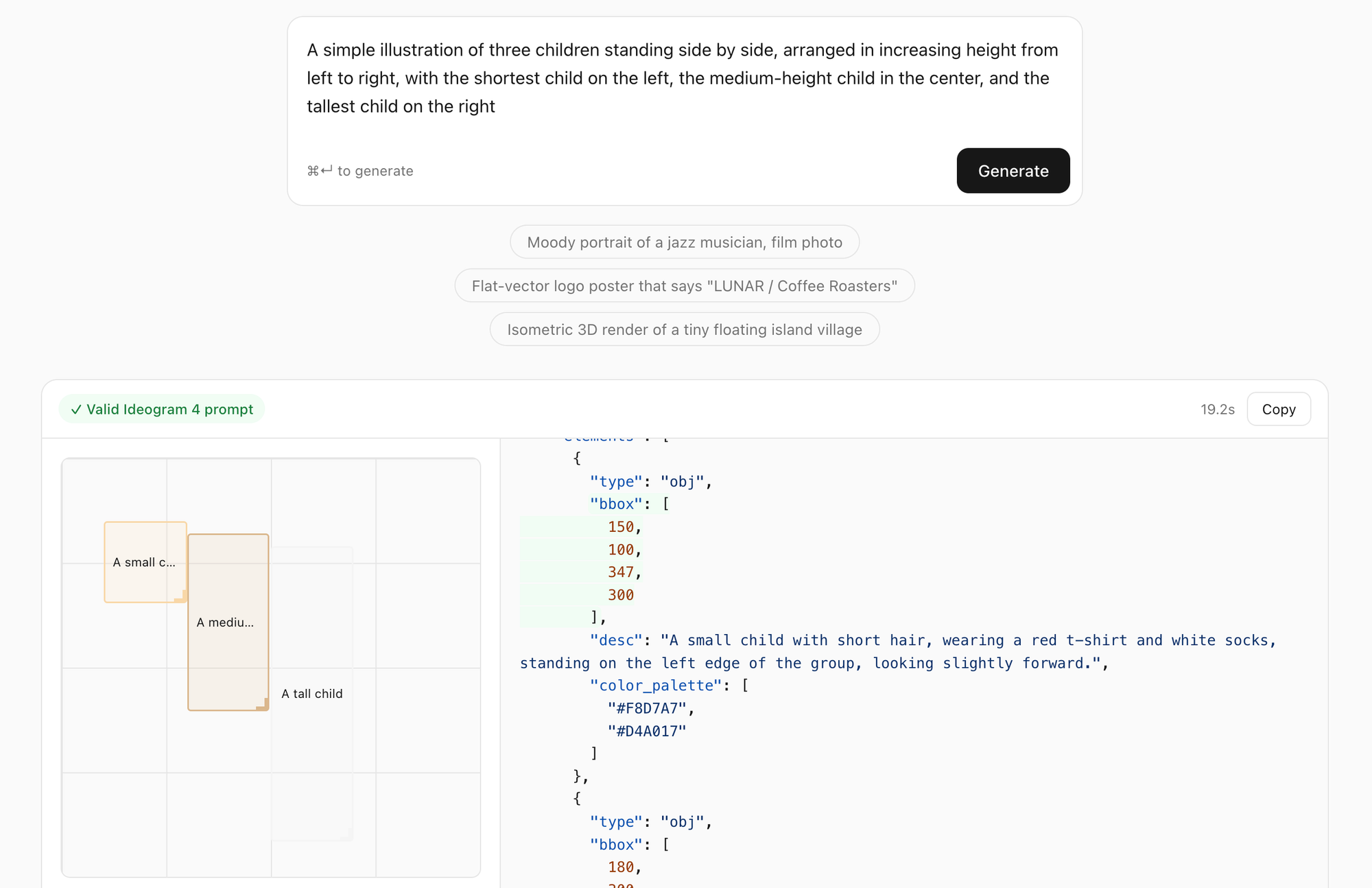
I pasted the JSON to ideogram and generated:

How I actually use it
Type a description, hit Generate. The trick to getting the most out of it is to give every element a placement word and a size word. Compare:
"A retro arcade game poster with a spaceship and an alien ship"
versus:
"A retro arcade game poster: the title 'GALAXY RAID' in chunky pixel letters across the top, a huge menacing alien mothership filling the right half, a small heroic pixel-art spaceship in the middle of the left half facing the mothership, and 'INSERT COIN' blinking at the bottom center."
The second one produces five elements with five distinct bounding boxes, each exactly where the words said. The title becomes a literal text element spanning the top banner; the mothership gets the entire right half; "INSERT COIN" lands in the classic bottom-center slot. This is the thing plain-text prompting fundamentally can't express — and with JSON it's just numbers.
Two more tips
- Quote any text you want rendered. "LUNAR / Coffee Roasters" gets copied character-for-character into a text element. Ideogram renders quoted text far more faithfully when it arrives this way.
- Name a medium. "film photo", "watercolor", "pixel art", "flat vector logo" - it steers the whole style block, including whether you get the photo variant (with camera/lens fields) or the art variant.
The layout editor
Here's my favorite part. When a result comes back, you don't just get JSON. You get a visual layout preview: every element drawn as a draggable box on the 0–1000 canvas, tinted with that element's own palette color.
Drag a box to move it, pull the corner to resize, and the bbox numbers update in the JSON live, side by side. Edits are clamped to the canvas, so you can't drag your way into an invalid prompt.
So the workflow becomes: describe roughly:
- generate
- nudge the composition with your mouse
- copy
- paste into Ideogram.
No coordinate math, ever.
Why local matters here
A prompt-rewriting tool is something you iterate with — you'll run it dozens of times while dialing in one image. That's exactly the usage pattern where cloud APIs get expensive and rate-limited, and where sending every half-formed creative idea to a third party feels unnecessary.
A 4B model is plenty for this job because the grammar does the heavy lifting: the model only has to be creative, not careful. The schema correctness is enforced by machinery, not by model size.
Total cost: one 2.5 GB download and some electricity.



Ideoprompt lets you explain an image in descriptive natural language and generates an Ideogram bbox JSON prompt, completely local (via Qwen3)
This means you can use Ideogram like using gpt-image-2, simply describe the image with natural language, and the local LLM (Qwen) turns that into Ideogram JSON prompt that's validated against the Ideogram prompt schema. Which means you get 100% correct prompts you can use on your favorite Ideogram image generation app.
Example
Here I entered:
I pasted the JSON to ideogram and generated:
How I actually use it
Type a description, hit Generate. The trick to getting the most out of it is to give every element a placement word and a size word. Compare:
versus:
The second one produces five elements with five distinct bounding boxes, each exactly where the words said. The title becomes a literal text element spanning the top banner; the mothership gets the entire right half; "INSERT COIN" lands in the classic bottom-center slot. This is the thing plain-text prompting fundamentally can't express — and with JSON it's just numbers.
Two more tips
The layout editor
Here's my favorite part. When a result comes back, you don't just get JSON. You get a visual layout preview: every element drawn as a draggable box on the 0–1000 canvas, tinted with that element's own palette color.
Drag a box to move it, pull the corner to resize, and the bbox numbers update in the JSON live, side by side. Edits are clamped to the canvas, so you can't drag your way into an invalid prompt.
So the workflow becomes: describe roughly:
No coordinate math, ever.
Why local matters here
A prompt-rewriting tool is something you iterate with — you'll run it dozens of times while dialing in one image. That's exactly the usage pattern where cloud APIs get expensive and rate-limited, and where sending every half-formed creative idea to a third party feels unnecessary.
A 4B model is plenty for this job because the grammar does the heavy lifting: the model only has to be creative, not careful. The schema correctness is enforced by machinery, not by model size.
Total cost: one 2.5 GB download and some electricity.