I built this app to solve my own pain point, in 30 minutes, using nothing but AI (ChatGPT Codex 5.3)
EDIT: Posted on X https://x.com/cocktailpeanut/status/2019834796026081667?s=20
Editing and cropping videos, images and audio clips has been the biggest pain point of mine, especially since I have to post a lot of content to share how pinokio apps work after trying out myself. And surprisingly, there is no good media cropper you can use locally and privately and for free.
Problem
- I want to take a video with black margins and crop them so i can share clean video without the black margins on social media
- i want to crop images so they are optimized for social media
- i want to crop audio files or video files from one timestamp to another (short duration) so i can use them as reference audio/video when running audio/video AI generation.
For all of these cases there has not been a simple solution that works privately and for completely free. The only free options were online websites with tons of spammy ad and malware popups, which requires me to upload my files to their servers.
Solution
Yesterday ChatGPT Codex 5.3 was launched and i heard a lot of good things about it, so decided to take this opportunity to experiment with building an app from scratch 100% using AI.
I wrote a detailed description of what i exactly want, and submitted to codex, and waited for like 30 minutes. And I got this app. And this is amazing. Exactly what I want.
What it does
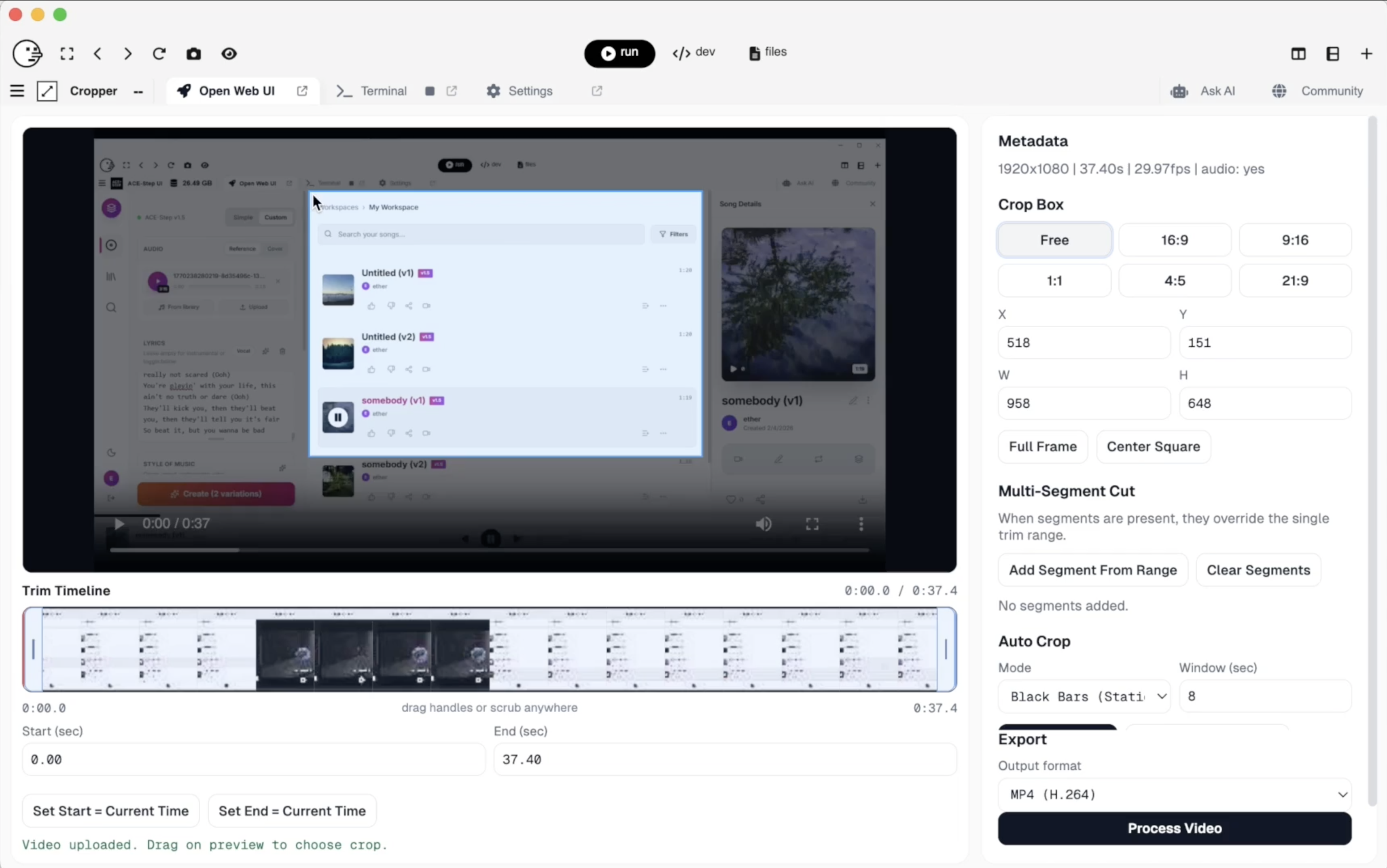
- video crop: crop regions, crop time, create a new video with multiple cropped segments
- image crop: crop to social media optimized dimensions
- audio crop: crop time, create a new audio clip with multiple cropped segments
- auto crop: automatically crop black margins in image/video
Feature set
- Core Media Support
- Accepts video, image, and audio uploads from one UI.
- Uses ffprobe to auto-detect actual media type (not just extension).
- Works with formats that local ffmpeg/ffprobe can decode.
- Upload, Storage, and Lifecycle
- files are ephemeral. it will process them and the byproduct will be deleted.
- Stores uploads under app/tmp/uploads//.
- Stores outputs under app/tmp/outputs//.
- Saves per-upload and per-output metadata as JSON manifests.
- Auto-cleans uploads/outputs/jobs after 1 hour of inactivity.
- Touches files/folders on access so active items don’t expire too early.
- UI / UX
- drag and drop or click to upload
- Minimal, low-divider visual style with responsive layout.
- Adaptive Interface
- video mode shows crop + timeline + segments + auto-crop.
- audio mode shows trim + segments + waveform (crop/auto-crop hidden).
- Cropping Features (Video/Image)
- Manual crop box with drag-to-draw.
- Move existing crop box by dragging inside it.
- Resize from edges/corners with proper resize cursors.
- Numeric crop inputs (X/Y/W/H) synced with visual crop box.
- For video, crop values are normalized to even dimensions (ffmpeg-safe).
- Trim / Timeline Features
- Interactive trim window with draggable start/end handles.
- Move entire trim range by dragging selected range.
- Scrub anywhere on timeline to seek in real time.
- Live playhead + current/duration labels.
- Manual trim numeric inputs + “Set Start/End = Current Time”.
- Video thumbnail strip generated client-side by sampled seeks.
- Audio waveform strip fetched from backend.
- Remove individual segments.
- Clear all segments.
- If segments exist, they override single trim range.
- Auto-Crop Intelligence
- Black-bar detection (black_static, black_adaptive).
- Subject/activity detection via motion vectors (subject_static, subject_adaptive).
- Static mode returns one crop recommendation.
- Adaptive mode (video) returns time-window crop plan.
- Image auto-crop always resolves to static crop.
- Subject detection falls back to black-bar detection when needed.
- Processing Pipeline
- Async job API with polling and progress/stage updates.
- Also keeps blocking /api/process endpoint for compatibility.
- Video pipeline supports:
- Optional adaptive crop pre-pass.
- Optional static crop.
- Single-range trim or multi-segment concat.
- Image pipeline supports:
- Optional crop.
- Re-encode/export to chosen image format.
- Audio pipeline supports:
- Single-range trim or multi-segment concat.
- Export to chosen audio format.
- Output Formats
- Video export: mp4 (H.264/AAC), webm (VP9/Opus).
- Image export: png, jpg, webp.
- Audio export: mp3, wav, m4a, flac.
- Default output per type: video=mp4, image=png, audio=mp3.
- Result Handling
- Download link for final output.
- In-app preview of output:
- Video player for video results.
- Image preview for image results.
- Audio player for audio results.
- Dedicated stream/download endpoints for produced outputs.
What this means
This means, you will no longer have to settle for suboptimal solutions. You will never be forced to pay for things because some SaaS company got you hooked and suddenly pulled a bait and switch scheme to force you to pay, using your data as hostage. You will no longer have to rely on some arrogant developer who refuse to listen to your feedback.
I built this entire app with a built-in launcher, with just one prompt in pinokio. You can too.
You can just build things.

 AboutCroppercocktailpeanut/cropper
I built this app to solve my own pain point, in 30 minutes, using nothing but AI (ChatGPT Codex 5.3)
Editing and cropping videos, images and audio clips has been the biggest pain point of mine, especially since I have to post a lot of content to share how pinokio apps work after trying out myself. And surprisingly, there is no good media cropper you can use locally and privately and for free.
Problem
For all of these cases there has not been a simple solution that works privately and for completely free. The only free options were online websites with tons of spammy ad and malware popups, which requires me to upload my files to their servers.
Solution
Yesterday ChatGPT Codex 5.3 was launched and i heard a lot of good things about it, so decided to take this opportunity to experiment with building an app from scratch 100% using AI.
I wrote a detailed description of what i exactly want, and submitted to codex, and waited for like 30 minutes. And I got this app. And this is amazing. Exactly what I want.
What it does
Feature set
What this means
This means, you will no longer have to settle for suboptimal solutions. You will never be forced to pay for things because some SaaS company got you hooked and suddenly pulled a bait and switch scheme to force you to pay, using your data as hostage. You will no longer have to rely on some arrogant developer who refuse to listen to your feedback.
I built this entire app with a built-in launcher, with just one prompt in pinokio. You can too.
You can just build things.